alt-display
alt_display_output_type (form) — Function
Determine the type of output to be printed. Form must be a lisp
form suitable for printing via Maxima’s built-in displa
function. At present, this function returns one of three values:
text, label or unknown.
An example where alt_display_output_type is used. In
my_display, a text form is printed between a pair of tags
TEXT;>> and <<TEXT; while a label form is printed between
a pair tags OUT;>> and <<OUT; in addition to the usual
output label.
The function set_prompt also ensures that input labels are
printed between matching PROMPT;>> and <<PROMPT; tags.
(%i1) (load(“mactex-utilities”), load(“alt-display.mac”)) $
(%i2) define_alt_display(my_display(form),
block([type,txttmplt,labtmplt],
txttmplt:“%TEXT;>>%a%<<TEXT;%”,
labtmplt:“%OUT;>>~%(a) %”,
type:alt_display_output_type(form),
if type=’text then
printf(true,txttmplt,first(form))
else if type=’label then
printf(true,labtmplt,first(form),“$$”,tex1(second(form)),“$$”)
else
block([alt_display1d:false, alt_display2d:false], displa(form)))) $a~a~a%<<OUT;
(%i3) (set_prompt(’prefix, “PROMPT;>>”,’suffix, “<<PROMPT;”), set_alt_display(1,my_display)) $
PROMPT;>>(%i4) <<PROMPT;integrate(x^n,x); PROMPT;>> TEXT;>> Is n equal to -1? <<TEXT; <<PROMPT; n;
OUT;>> (%o4) $$\frac{x^{n+1}}{n+1}$$ <<OUT; PROMPT;>>(%i5) <<PROMPT;
See also: set_prompt.
define_alt_display (function(input), expr) — Function
This function is similar to define: it evaluates its arguments
and expands into a function definition. The function is a
function of a single input input. For convenience, a substitution
is applied to expr after evaluation, to provide easy access to
Lisp variable names.
Set a time-stamp on each prompt:
(%i1) load("alt-display.mac")$

(%i2) display2d: false$

(%i3) define_alt_display(time_stamp(x),
                block([alt_display1d:false,alt_display2d:false],
                      prompt_prefix:printf(false,"~a~%",timedate()),
                      displa(x)));

(%o3) time_stamp(x):=block(
                 [\*alt\-display1d\*:false,
                  \*alt\-display2d\*:false],
                 \*prompt\-prefix\*
                  :printf(false,"~a~%",timedate()),displa(x))
(%i4) set_alt_display(1,time_stamp);

(%o4) done
2017-11-27 16:15:58-06:00
(%i5)
The input line %i3 defines time_stamp using
define_alt_display. The output line %o3 shows that the
Maxima variable names alt_display1d, alt_display2d and
prompt_prefix have been replaced by their Lisp translations, as
has displa been replaced by ?displa (the display
function).
The display variables alt_display1d and alt_display2d are
both bound to false in the body of time_stamp to prevent
an infinite recursion in displa.
info_display (form) — Function
This is an alias for the default 1-d display function. It may be used as an alternative 1-d or 2-d display function.
(%i1) load("alt-display.mac")$

(%i2) set_alt_display(2,info_display);

(%o2) done
(%i3) x/y;

(%o3) x/y
mathml_display (form) — Function
Produces MathML output.
(%i1) load("alt-display.mac")$

(%i2) set_alt_display(2,mathml_display);
<math xmlns="http://www.w3.org/1998/Math/MathML"> <mi>mlabel</mi>
 <mfenced separators=""><msub><mi>%o</mi> <mn>2</mn></msub>
 <mo>,</mo><mi>done</mi> </mfenced> </math>
multi_display_for_texinfo (form) — Function
Produces Texinfo output using all three display functions.
(%i2) set_alt_display(2,multi_display_for_texinfo)$

(%i3) x/(x^2+y^2);

@iftex
@tex
\mbox{\tt\red({\it \%o_3}) \black}$${{x}\over{y^2+x^2}}$$
@end tex
@end iftex
@ifhtml
@html

   <math xmlns="http://www.w3.org/1998/Math/MathML"> <mi>mlabel</mi>
   <mfenced separators=""><msub><mi>%o</mi> <mn>3</mn></msub>
   <mo>,</mo><mfrac><mrow><mi>x</mi> </mrow> <mrow><msup><mrow>
   <mi>y</mi> </mrow> <mn>2</mn> </msup> <mo>+</mo> <msup><mrow>
   <mi>x</mi> </mrow> <mn>2</mn> </msup> </mrow></mfrac> </mfenced> </math>
@end html
@end ifhtml
@ifinfo
@example
(%o3) x/(y^2+x^2)
@end example
@end ifinfo
reset_displays () — Function
Resets the prompt prefix and suffix to the empty string, and sets both 1-d and 2-d display functions to the default.
set_alt_display (num, display-function) — Function
The input num is the display to set; it may be either 1 or 2. The
second input display-function is the display function to use. The
display function may be either a Maxima function or a lambda
expression.
Here is an example where the display function is a lambda
expression; it just displays the result as TeX.
(%i1) load("alt-display.mac")$

(%i2) set_alt_display(2, lambda([form], tex(?caddr(form))))$

(%i3) integrate(exp(-t^2),t,0,inf);
$${{\sqrt{\pi}}\over{2}}$$
A user-defined display function should take care that it prints its output. A display function that returns a string will appear to display nothing, nor cause any errors.
set_prompt (fix, expr) — Function
Set the prompt prefix or suffix to expr. The input fix must
evaluate to one of prefix, suffix, general,
prolog or epilog. The input expr must evaluate to
either a string or false; if false, the fix is reset
to the default value.
(%i1) load("alt-display.mac")$
(%i2) set_prompt('prefix,printf(false,"It is now: ~a~%",timedate()))$

It is now: 2014-01-07 15:23:23-05:00
(%i3)
The following example shows the effect of each option, except
prolog. Note that the epilog prompt is printed as Maxima
closes down. The general is printed between the end of input and
the output, unless the input line ends in $.
Here is an example to show where the prompt strings are placed.
(%i1) load("alt-display.mac")$

(%i2) set_prompt(prefix, "<<prefix>> ", suffix, "<<suffix>> ",
                 general, printf(false,"<<general>>~%"),
                 epilog, printf(false,"<<epilog>>~%"));

(%o2)                                done
<<prefix>> (%i3) <<suffix>> x/y;
<<general>>
                                       x
(%o3)                                  -
                                       y
<<prefix>> (%i4) <<suffix>> quit();
<<general>>
<<epilog>>
Here is an example that shows how to colorize the input and output when Maxima is running in a terminal or terminal emulator like Emacs
Readers using the info reader in Emacs will
see the actual prompt strings; other readers will see the colorized
output
.
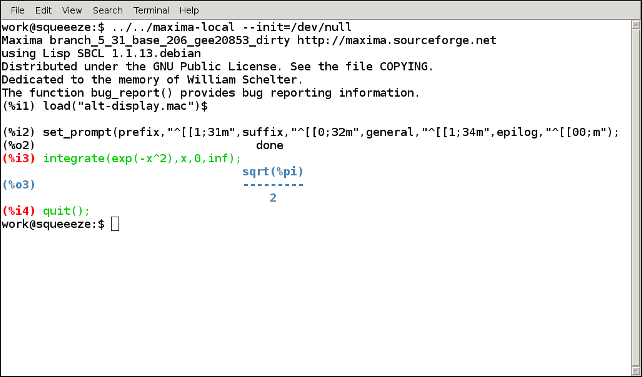
Each prompt string starts with the ASCII escape character (27) followed by an open square bracket (91); each string ends with a lower-case m (109). The webpages https://misc.flogisoft.com/bash/tip_colors_and_formatting and https://www.tldp.org/HOWTO/Bash-Prompt-HOWTO/x329.html provide information on how to use control strings to set the terminal colors.
tex_display (form) — Function
Produces TeX output.
(%i2) set_alt_display(2,tex_display);
\mbox{\tt\red({\it \%o_2}) \black}$$\mathbf{done}$$
(%i3) x/(x^2+y^2);
\mbox{\tt\red({\it \%o_3}) \black}$${{x}\over{y^2+x^2}}$$